


Hi everybody,
Please read this before if you wanna create your resource or upload your wordpress items.
- Search before if want to create new resource and if you want update my resource, plz tell me to move resource to your account.
- You can create the own resource if you have the purchase items or the clean items without tags ( Untouched ) and the same resource doesn't exist already
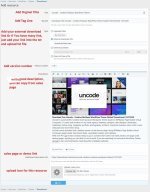
-How To Create New Resource ( After Create New Resource automatically Discussion Page Created On First Page )
How To Update Your Resource:
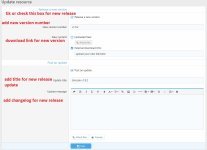
For Updating Just go to your resource page u want to be updated and click on "POST AN UPDATE"
Also Your Resource Need To Be Approved before publish so be patient
Thanks
Somanath
Please read this before if you wanna create your resource or upload your wordpress items.
The first and most important thing to do: if you upload resources from codecanyon or themeforest please make sure that you remove from your archive name the unique identifier number found right after codecanyon word
Example: themeforest-TCMJuqoG-coowhm-multipurpose-whmcs-template.zip
remove TCMJuqoG code so the archive name will be:
themeforest-coowhm-multipurpose-whmcs-template.zip
- Search before if want to create new resource and if you want update my resource, plz tell me to move resource to your account.
- You can create the own resource if you have the purchase items or the clean items without tags ( Untouched ) and the same resource doesn't exist already
-How To Create New Resource ( After Create New Resource automatically Discussion Page Created On First Page )
How To Update Your Resource:
For Updating Just go to your resource page u want to be updated and click on "POST AN UPDATE"
Also Your Resource Need To Be Approved before publish so be patient
Thanks
Somanath